 Little Big Things: Building A Great UX With Modern CSSLittle Big Things: Building A Great UX With Modern CSS
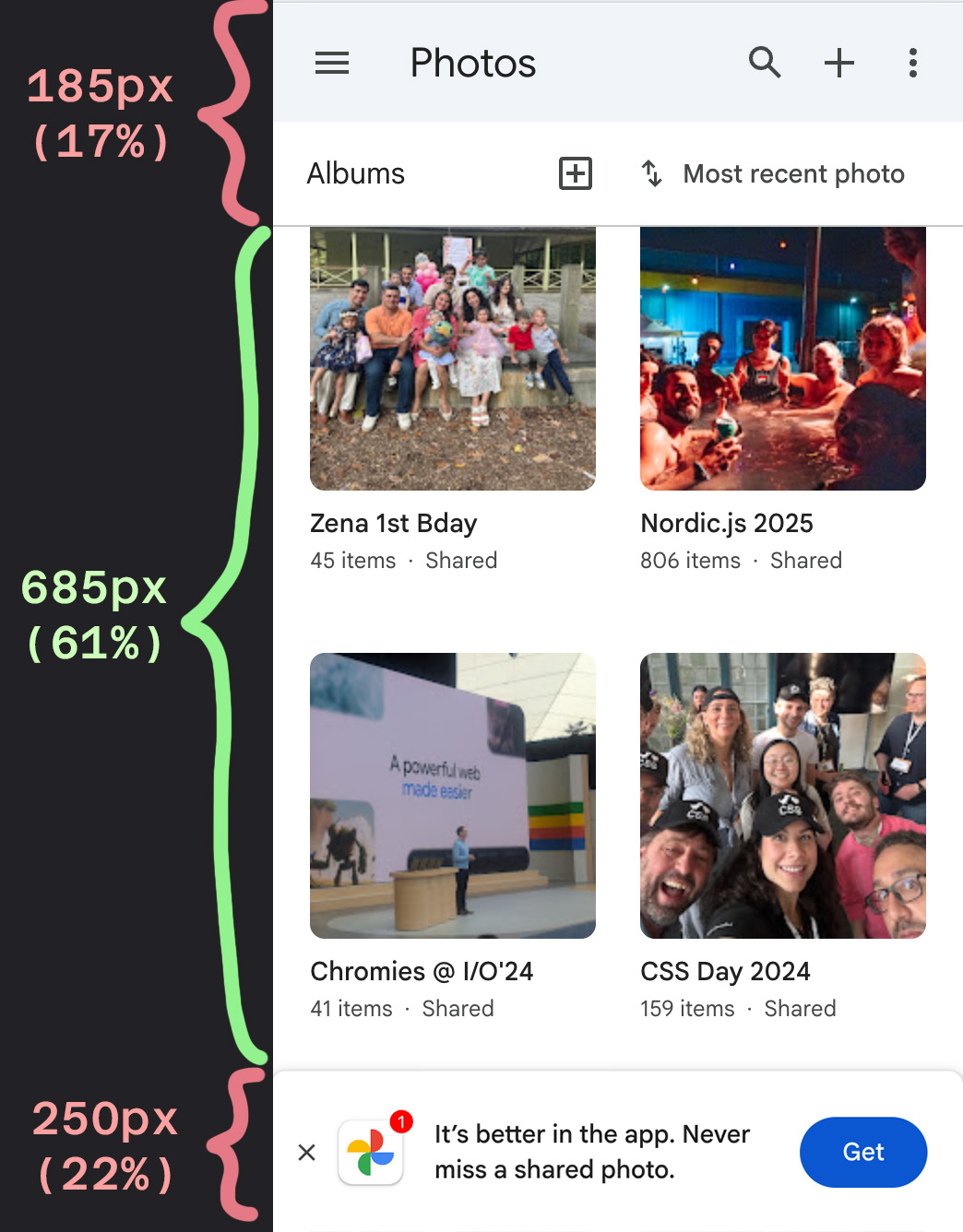
Avoid pop-ups/banners that obscure the screen.
Eliminate visual clutter and application borders.
Keeping the interface clean and focused.
scrollable
stuck
snapped
scrolled
html {
  container-type: scroll-state;
}

header {
  /*  Check if there has been a scroll  */
  @container (not scroll-state(scrolled: none)) {
    /* convert to sticky pos & add transition */
    position: sticky;
    top: 0;
    transition: translate 0.3s;
  }

  /* Hide when you scroll down */
  @container scroll-state(scrolled: bottom) {
    translate: 0 -100%;
  }

  /* appear when you scroll back up */
  @container scroll-state(scrolled: top) {
    translate: 0 0;
  }
}.info, h2, header, #button-edit, .bg {
animation-timeline: scroll();
animation-range: 0 150px;
}
.info {
animation: adjust-info linear both;
}
.info h2 {
animation: shrink-name linear both;
}
header {
animation: add-shadow linear both;
}
...Just landed in Chrome 146:
<button popovertarget="my-tooltip">
  <p aria-hidden="true">?</p>
  <p class="sr-only">Open Tooltip</p>
</button>

<div id="my-tooltip" class="tooltip" popover>
  <p>I am a tooltip with more information.<p>
</div>
  #my-tooltip {
  inset: auto;
  position-area: top;
  position-try: flip-block;
}
.tooltip {
  container-type: anchored;

  /*  arrow  */
  &::before {
    content: '';
    top: 100%;
    left: 50%;
    border: solid transparent;
    border-top-color: var(--tooltip-bg);
    ...

    @container anchored(fallback: flip-block) {
      bottom: 100%;
      top: calc(-2 * var(--spacer));
      border-top-color: transparent;
      border-bottom-color: var(--tooltip-bg);
    }
  }
Just landed in Chrome 147: border-shape
 <!-- Invoker -->
<button popovertarget="my-tooltip">
  <p aria-hidden="true">?</p>
  <p class="sr-only">Open Tooltip</p>
</button>

<!-- Popover -->
<div id="my-tooltip" class="tooltip" popover>
  <p>Lavender and fuchsia danced...</p>
</div>
 <!-- Invoker -->
<button interestfor="my-tooltip">
  <p aria-hidden="true">?</p>
  <p class="sr-only">Open Tooltip</p>
</button>

<!-- Popover -->
<div id="my-tooltip" class="tooltip" popover>
  <p>Lavender and fuchsia danced...</p>
</div>
<p>Hi! My name is <a href="https://una.im"
  interestfor="--una">Una Kravets</a>.
I'm a CSS and UI enthusiast...</p>

<div id="--una" popover="hint">
  <header>
    <picture>
      <img src="una.jpg" alt="Una">
    </picture>
    <div>
      <h2>una</h2>
      <a href="https://una.im">una.im</a>
    </div>
    <button>Follow</button>
  </header>
</div>
[interestfor] {
  interest-delay-start: 0.3s;
}

.parent:has(:interest-source) [interestfor] {
  interest-delay-start: 0s;
}
Protip from Emil Kowalski —>
popover=auto |
popover=manual |
popover=hint |
|
|---|---|---|---|
Light dismiss (via click-away or esc key) |
✅ Yes | 🚫 No | ✅ Yes |
Closes other popover=auto elements when opened |
✅ Yes | 🚫 No | 🚫 No |
Closes other popover=hint elements when opened |
✅ Yes | 🚫 No | ✅ Yes |
Closes other popover=manual elements when opened |
🚫 No | 🚫 No | 🚫 No |
Can open and close popover with JS (showPopover() or hidePopover()) |
✅ Yes | ✅ Yes | ✅ Yes |
| Default focus management for next tab stop | ✅ Yes | ✅ Yes | ✅ Yes |
Can hide or toggle with popovertargetaction |
✅ Yes | ✅ Yes | ✅ Yes |
Can open within parent popover to keep parent open |
✅ Yes | ✅ Yes | ✅ Yes |
[interestfor] Polyfill
import interestfor from "https://esm.sh/interestfor";
[interestfor] {
  /*  for polyfill this must be a custom property */
  --interest-delay-start: 0.1s;
  --interest-delay-end: 0.1s;
  interest-delay-start: var(--interest-delay-start);
  interest-delay-end: var(--interest-delay-end);
}Morphing animations between states
View-transitions between pages
Intentional animations to guide user attention
linear())dialog[open] > * {
animation: entry-animation 0.6s
var(--subtle-spring) forwards;
/* 0.2s delay, then stagger w/sibling-index() */
animation-delay:
calc(sibling-index() * 0.05s + 0.2s);
}
@keyframes appear {
  from {
    opacity: 0;
    transform: translate(0px, 50px);
  }

  to {
    opacity: 1;
    transform: translate(0px, 0px);
  }
}

li {
  animation: appear linear both;
  animation-timeline: view();
  animation-range: entry 0 cover 25%;
}
Bring your own scroll markers
<ul class="parent">
  <li><a href="#intro">Introduction</a></li>
  <li><a href="#one">Section one</a></li>
</ul>

<div id="intro">Introduction</div>
<div id="one">Section one</div>
  .parent {
  scroll-target-group: auto;
}

a:target-current {
  /* styles for active TOC link */
}

.pointer-hand {
  position-anchor: --active-target;
}
(technically it's in every browser, there are just various compat bugs so its Baseline status is being debated right now)
.follower {
  /*  anchor the follower element  */
  position: fixed;
  position-anchor: --hovered;
}

.possible-anchor:hover {
  /*  update the active anchor  */
  anchor-name: --hovered;
}
Multi-anchors!
1. Dynamic re-targetting for "bubble"
2. Ephemeral tooltips using:
position-area
position-try-fallbacks
popover=hint
[interestfor]
(Touch of JS to preserve active state since we're
re-anchoring with :hover)
/* Show only one of two */
#feedback-form, .open #feedback-btn {
  display: none;
}

/* Give both the same v-t-name, because */
/* we want to morph the one into the other */
#feedback-form, #feedback-btn {
  view-transition-name: --feedback;
}

/* Capture the parent as a separate layer, */
/* so it animates too */
#parent {
  view-transition-name: --feedback-parent;
}

...button span {
view-transition-name: --icon;
}
}::view-transition-old(--icon) {
animation-name: fade-out;
}
::view-transition-new(--icon) {
animation-name: fade-in;
animation-delay: 0.15s;
}
::view-transition-old(--icon),
::view-transition-new(--icon) {
animation-duration: 0.3s;
animation-timing-function: ease;
}:root { --d: 1; } /* 1 = up, -1 = down, toggled in JS */
::view-transition-old(f) {
animation: .15s both slide-out;
}
::view-transition-new(f) {
animation: .15s both slide-in;
}
@keyframes slide-out {
to {
opacity: 0; transform: translateY(calc(var(--d) * -10px));
}
}
@keyframes slide-in {
from {
opacity: 0; transform: translateY(calc(var(--d) * 10px));
}
}
:root {
  --spring-easing: linear(
    0, 0.006, 0.025 2.8%, 0.101 6.1%,
    0.539 15.2%, 0.661 17.8%, 0.869 23.3%,
    0.967 27.2%, 0.994 29.4%,
    1.01 32.2%, 1.011 35.6%, 1.002 41.7%,
    0.996 46.1%, 1.001 54.4%, 1 100%
  );
}

.trigger-btn {
  anchor-name: --morph-trigger;
  view-transition-name: morph-ui;
  ...
}
We have scoped view transitions now in Chrome 147+
Respect user preferences (theming, motion, etc.)
Think about the user's context
Users co-design the experience with you
prefers-color-schemelight-dark() Luckily I work with some smart people who found a way around this
 @function)@function --light-dark(--light, --dark) {
result: if(
style(--scheme: dark): var(--dark); else: var(--light)
);
}
:root {
--scheme: light;
@media (prefers-color-scheme: dark) {
--scheme: dark;
}
}
.title {
  font-weight: --light-dark(700, 400); /* usage */
}Landed in all stable browsers as of yesterday
.button {
  background: var(--button-bg);
  color: contrast-color(var(--button-bg));
}
.card-title {
  color: if(
    style(--contrast-color: white): antiquewhite;
    else: midnightblue
  );
}

.card-label {
  color: if(
    style(--contrast-color: white): lemonchiffon;
    else: indigo
  );
}(No more boring selects)
select,
select::picker(select) {
  appearance: base-select;
}<select name="version-select" id="version-select"
<button>
<selectedcontent></selectedcontent>
</button>
<option value="core">
<div class="icon">
<span class="material-symbols">hub</span>
</div>
<div class="meta">
<div class="title">UnAI Core</div>
<div class="subtitle">Balanced speed...</div>
</div>
</option>
<option value="max">
...selectedcontent .subtitle,
selectedcontent .icon {
display: none;
}@function --radial-coord(--a, --rad) {
result: translate(
calc(cos(var(--a)) * var(--rad)),
calc(sin(var(--a)) * var(--rad))
);
}
.item {
--radius: calc(var(--btn-size) + var(--extra-space));
--delay: calc((sibling-index() - 1) * 0.1s);
--angle: calc((sibling-index() - 1) * -45deg);
transform: --radial-coord(var(--angle), var(--radius));
background: hsl(calc(sibling-index() * 40), 70%, 80%);
transition: transform 0.3s var(--delay) ease;
}